- create procedure sp_enable_disable_cdc_all_tables(@dbname varchar(100), @enable bit)
- as
- BEGIN TRY
- DECLARE @source_name varchar(400);
- declare @sql varchar(1000)
- DECLARE the_cursor CURSOR FAST_FORWARD FOR
- SELECT table_name
- FROM INFORMATION_SCHEMA.TABLES where TABLE_CATALOG=@dbname and table_schema='dbo' and table_name != 'systranschemas'
- OPEN the_cursor
- FETCH NEXT FROM the_cursor INTO @source_name
- WHILE @@FETCH_STATUS = 0
- BEGIN
- if @enable = 1
- set @sql =' Use '+ @dbname+ ';EXEC sys.sp_cdc_enable_table
- @source_schema = N''dbo'',@source_name = '+@source_name+'
- , @role_name = N'''+'dbo'+''''
- else
- set @sql =' Use '+ @dbname+ ';EXEC sys.sp_cdc_disable_table
- @source_schema = N''dbo'',@source_name = '+@source_name+', @capture_instance =''all'''
- exec(@sql)
- FETCH NEXT FROM the_cursor INTO @source_name
- END
- CLOSE the_cursor
- DEALLOCATE the_cursor
- SELECT 'Successful'
- END TRY
- BEGIN CATCH
- CLOSE the_cursor
- DEALLOCATE the_cursor
- SELECT
- ERROR_NUMBER() AS ErrorNumber
- ,ERROR_MESSAGE() AS ErrorMessage;
- END CATCH
Showing posts with label Sql. Show all posts
Showing posts with label Sql. Show all posts
Wednesday, 24 February 2016
SQL Server Query for Enabling Change Data Capture On All Tables

Introduction To CDC (Change Data Capture) Of SQL Server - Part One
In this article, we will look intoa SQL Server feature, called CDC, used for tracking/auditing database changes at table level. This feature will help us to track database changes like INSERT, UPDATE and DELETE on tables.
It even tracks old and new values for an update operation. CDC uses SQL Server transaction logs for capturing all inserts, updates, and deletes on a table. This feature is available on 2008 or higher versions and part of enterprise editions. Let’s open management studio and enable CDC on EmployeeDB to track the changes by following the below steps:
Enable CDC on a database by running the following command, it needs sysadmin privileges.

Create a role to which we will give access to CDC tables (which will hold all data changes) using the following command:
It even tracks old and new values for an update operation. CDC uses SQL Server transaction logs for capturing all inserts, updates, and deletes on a table. This feature is available on 2008 or higher versions and part of enterprise editions. Let’s open management studio and enable CDC on EmployeeDB to track the changes by following the below steps:
Enable CDC on a database by running the following command, it needs sysadmin privileges.
Create a role to which we will give access to CDC tables (which will hold all data changes) using the following command:
- CREATEROLEcdc_role
- EXECsys.sp_cdc_enable_table
- @source_schema='dbo',-- Schema name
- @source_name='employees',-- Table Name
- @role_name=N'cdc_role'-- Role having access on CDC tables [having data audit details]


Let’s test CDC by doing some changes to employees table:

Let’s query our tracking table [dbo_employees_CT]:

If column _$operation is 1 it means it’s a DELETE operation; 2 means INSERT; 3 means Value before UPDATE; and 4 means Values after UPDATE. We will write the following query to get results more meaningfully:

Apart from dbo_employees_CT table, we have other tables created by CDC under System Tables to store metadata for its tracking purpose. Let’s understand purpose of each:
Captured_columns: It has all column’s details on which CDC is enabled:

Change_tables: It contains capture details like table name, role name etc along start and end lsn. Any change on a table is uniquely identified by LSN (log sequence number).

ddl_history: It contains information on any schema changes on the tracking table [employees] like adding\removing a column. Here, I added a new column location.

index_columns: It contains index details of tables on which tracking is enabled.

lsn_time_mapping: It contains mapping details of table change’s LSN and its time of occurrence:

I am ending things here. In next article, we will drill down more on CDC. I hope this article will be helpful for all.
Two options to store user friendly column names in SQL Server
Problem
Report-writing often involves putting labels on columns for easy recognition by the end users. Sometimes these labels change as the business changes and different users adopt the system. Are there any easy ways to automate displaying user-friendly column names with a minimum amount of rework in reports? Check out this tip to learn more.Solution
This article will review two approaches to storing user-friendly output in SQL Server itself. The first option that will be outlined is using SQL Server Extended Properties. The second option is using SQL Server Views.SQL Server Extended Properties
SQL Server allows classes of documentation to be written into the database. See Using Extended Properties on Database Objects for the complete list. This tip will focus on columns and tables for use with user-readable output.Starting with the basics, below is a script that creates a database, table and adds two column captions.
|
Extended Property creation code
|
|---|
use master
go
if db_id('SQLTips_UFOutput') > 0
 drop database SQLTips_UFOutput
go
create database SQLTips_UFOutput
go
use SQLTips_UFOutput
go
create table person (
 pers_id int identity(1,10) not null,
 pers_fname varchar(50) not null,
 pers_ssn varchar(12) not null,
 constraint PK_pers primary key (pers_id)
)
insert into person values
 ('John', '123-45-6789'),
 ('Luke', '987-00-1249'),
 ('Janet', '232-34-3208')
EXEC sp_addextendedproperty
@name = N'Caption', @value = 'First name',
@level0type = N'Schema', @level0name = dbo,
@level1type = N'Table',  @level1name = person,
@level2type = N'Column', @level2name = pers_fname;
GO
EXEC sp_addextendedproperty
@name = N'Caption', @value = 'Social Security number',
@level0type = N'Schema', @level0name = dbo,
@level1type = N'Table',  @level1name = person,
@level2type = N'Column', @level2name = pers_ssn;
GO
|
Confirm the text is saved by calling a function with parameter values that drill down to the table.
|
Extended Property retrieval code
|
|---|
select * from fn_listextendedproperty( 'caption', N'schema', 'dbo', N'table', 'person', N'column', default ) |
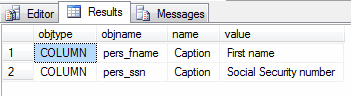
|
Extended Property integration into result set
|
|---|
declare @dynSQL nvarchar(4000), -- SQL command the run built using the captions @colName varchar(50), -- SQL column name @colAlias varchar(50), -- Caption defined as an extendedproperty @comma bit -- flag used for proper SQL string-building declare colAlias cursor for select cast(exprop.objname as varchar), cast(exprop.value as varchar) from fn_listextendedproperty( 'caption', N'schema', 'dbo', N'table', 'person', 'column', default ) exprop -- if every column has an extended property; scroll down for a left join example inner join sys.columns syscol on cast(exprop.objname as varchar) collate SQL_Latin1_General_CP1_CI_AS = cast(syscol.name as varchar) collate SQL_Latin1_General_CP1_CI_AS -- these casts are explained below -- initialize output string set @dynSQL = 'select ' set @comma = 0 -- output each column name and alias open colAlias fetch from colAlias into @colName, @colAlias while @@fetch_status = 0 begin if @comma = 1 set @dynSQL = @dynSQL + ', ' set @dynSQL = @dynSQL + quotename(@colName) + ' as ' + quotename(@colAlias) set @comma = 1 fetch next from colAlias into @colName, @colAlias end close colAlias deallocate colAlias set @dynSQL = @dynSQL + ' from person' exec sp_executeSQL @dynSQL |
|
Results of dynamic SQL above
|
|---|
select [pers_fname] as [First name], [pers_ssn] as [Social Security number] from person |
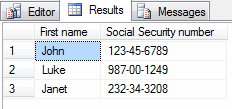
So why are there so many casts in the code above? They are used in response to this error message: Cannot resolve the collation conflict between "SQL_Latin1_General_CP1_CI_AS" and "Latin1_General_CI_AI" in the equal to operation. Good thing we're skilled mediators.
The above could be taken one step further to have the statement which writes the text "person" as a parameter and table name dynamic-generated as well. That would be all that's needed for user-friendly output once the captions have been added to tables.
Adding captions to every table seems redundant in cases where columns are fine as they are. This query uses a caption if there is one, otherwise the column name:
|
Retrieving Extended Properties or their column names when no captions exist
|
|---|
select
 coalesce(cast(exprop.objname as varchar) collate SQL_Latin1_General_CP1_CI_AS,
  syscol.name) as colname,
 coalesce(cast(exprop.value as varchar) collate SQL_Latin1_General_CP1_CI_AS,
  syscol.name) as colalias
from sys.columns syscol
 left outer join fn_listextendedproperty(
   'caption',
   N'schema', 'dbo',
   N'table', 'person',
   'column', default
  ) exprop on
  cast(exprop.objname as varchar) collate SQL_Latin1_General_CP1_CI_AS =
  cast(syscol.name as varchar) collate SQL_Latin1_General_CP1_CI_AS
where syscol.object_id = object_id('person')
|
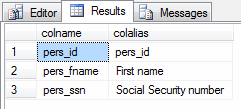
Here are a few notes on this code:
- The source table is sys.columns which may include unneeded columns in the report.
- The coalesces simply pick the first non-null value, and because all data types in its invocation need to be the same, that 43-character cast in needed.
- To use this query, simply replace the above cursor query with it.
|
Extended Properties updating
|
|---|
exec sp_updateextendedproperty @name = N'Caption', @value = 'Social Security #', @level0type = N'Schema', @level0name = dbo, @level1type = N'Table', @level1name = person, @level2type = N'Column',@level2name = pers_ssn; GO |
|
Extended Properties deleting
|
|---|
exec sp_dropextendedproperty @name = N'Caption', @level0type = N'Schema', @level0name = dbo, @level1type = N'Table', @level1name = person, @level2type = N'Column',@level2name = pers_ssn; GO |
|
Extended Properties creation for a table
|
|---|
EXEC sp_addextendedproperty @name = N'Caption', @value = 'Company Personnel', @level0type = N'Schema', @level0name = dbo, @level1type = N'Table', @level1name = person; GO select * from fn_listextendedproperty(null, N'schema', 'dbo', N'table', 'person', default, default) |
I applaud anyone that has read this far as that is an amount of code that may need cut down to reach production given the pace of organization and level of commitment to documentation. This next method recreates the ability to have user-friendly column names with far less typing.
Views
If there's only an interest in column or table aliasing, it's also possible to use views as opposed to the extended properties, without as much overhead. Here is an example:|
View creation for user-friendly columns
|
|---|
create view vuf_person as -- vuf = view user-friendly select pers_fname as [First name], pers_ssn as [Social Security number] from person go select * from vuf_person |
|
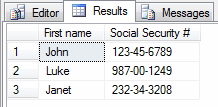
View updating for user-friendly columns
|
|---|
alter view vuf_person as select pers_fname as [First name], pers_ssn as [Social Security #] from person go select * from vuf_person |
|
View creation for user-friendly table names
|
|---|
create view [Personnel Report] as select pers_fname as [First name], pers_ssn as [Social Security #] from person go select * from [Personnel Report] |
Next Steps
- Decide what level of documentation to store in the database
- If only column- and table-level captions are needed, the view option is possible and requires less code
- Consider isolating new tables with user-friendly views that use human-readable aliases
- Use those views in SSRS and enjoy how the column names are user-friendly without any work
- Create an interface for users to allow updating the view column aliases that uses a dynamically-generated ALTER VIEW statement
- Read more about sp_addextendedproperty, sp_updateextendedproperty, sp_deleteextendedproperty and the complete list of extended properties
- Be creative. What else could these captions be used for? How else could they be organized? Are there any other extended properties that seem useful in your environment?
Tuesday, 23 June 2015
SQL SERVER – Difference Between Index Rebuild and Index Reorganize Explained with T-SQL Script
Index Rebuild : This process drops the existing Index and Recreates the index.
Index Reorganize : This process physically reorganizes the leaf nodes of the index.
Recommendation: Index should be rebuild when index fragmentation is great than 40%. Index should be reorganized when index fragmentation is between 10% to 40%. Index rebuilding process uses more CPU and it locks the database resources. SQL Server development version and Enterprise version has option ONLINE, which can be turned on when Index is rebuilt. ONLINE option will keep index available during the rebuilding.
USE AdventureWorks;GOALTER INDEX ALL ON Production.Product REBUILD
GO
Index Reorganize : This process physically reorganizes the leaf nodes of the index.
USE AdventureWorks;GOALTER INDEX ALL ON Production.Product REORGANIZE
GO
Recommendation: Index should be rebuild when index fragmentation is great than 40%. Index should be reorganized when index fragmentation is between 10% to 40%. Index rebuilding process uses more CPU and it locks the database resources. SQL Server development version and Enterprise version has option ONLINE, which can be turned on when Index is rebuilt. ONLINE option will keep index available during the rebuilding.
Saturday, 2 May 2015
SQL SERVER – 2005 – List All The Constraint of Database – Find Primary Key and Foreign Key Constraint in Database
SELECT OBJECT_NAME(OBJECT_ID) AS NameofConstraint,
SCHEMA_NAME(schema_id) AS SchemaName,
OBJECT_NAME(parent_object_id) AS TableName,
type_desc AS ConstraintType
FROM sys.objects
WHERE type_desc LIKE '%CONSTRAINT'
select * from INFORMATION_SCHEMA.CONSTRAINT_COLUMN_USAGE
Subscribe to:
Posts (Atom)